What is datacur8?
datacur8 is a config-driven command-line tool that validates, exports, and tidies structured data files (JSON, JSONL/NDJSON, YAML, CSV/TSV, HCL, and TOML) intended to live in a Git repository. It brings database-style integrity checks to file-based datasets, without forcing you to build a database app.
The problem: When teams need to manage “slow-moving” datasets, they usually end up in one of two bad places:
- Build a custom CRUD application just to edit and release data, or
- Rely on a messy mix of Excel sheets, ad hoc CSVs, and hand-edited property files with no consistent rules.
In the first case you are spending engineering time not addressing your core business problems. In the second path, there’s nothing enforcing schemas, uniqueness, foreign keys, naming conventions, or basic consistency, so mistakes slip through and surface later as production incidents.
This solution gives you the middle ground. You define data types, schemas, and constraints once in a single standard .datacur8 file. Then datacur8 deterministically validates the entire data set locally, emits clear errors, and runs the same checks in a deployment pipeline. That means non-technical or semi-technical contributors can safely edit plain-text files through workflows they already use (like GitHub pull requests), while datacur8 provides the guardrails to ensure changes are validated and deployable before they ship.
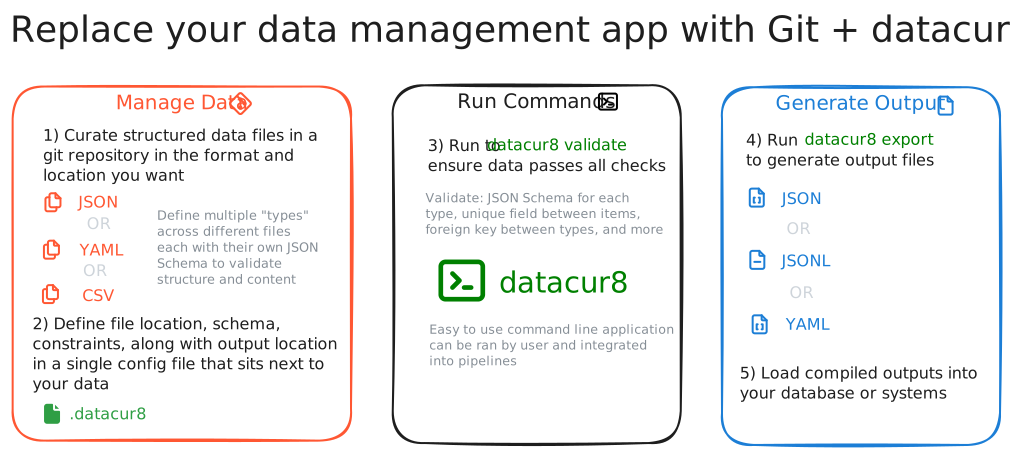
Key Features
- JSON Schema validation — validate every data file against an inline JSON Schema with full-featured support via
google/jsonschema-go - Cross-file constraints — enforce uniqueness, foreign keys, and path-to-attribute rules across files and types
- Export — compile validated data into deterministic JSON, YAML, JSONL/NDJSON, HCL, CSV, or TOML output files
- Tidy — normalize formatting (sorted keys, stable ordering) for clean diffs
- Strict mode — optionally enforce
additionalProperties: falseon all object schemas - JSONL/NDJSON support — one object per line, record-level diagnostics, and canonical tidy
- CSV/TSV support — schema-guided input conversion with header validation, plus deterministic export of complete flat scalar datasets
- TOML support — TOML 1.1.0 records, checked JSON conversion, aggregate exports, and canonical tidy
- HCL support — attribute-based HCL2 input validated with JSON Schema, HCL exports, and comment-preserving formatting
- Git-friendly — designed for CI pipelines; identical results locally and in automation
Quick Start
The following provides an example of a realistic starting place for how datacur8 can be used to manage a realistic dataset where you have multiple data types that are related to each other and you want to enforce constraints within and across them. In this example, we have a simple dataset of teams and apps, where each team has multiple apps and we want to ensure that all the data is consistent and valid before it gets deployed. You want fields within the files to match the file names and you want the JSON Schema to enforce the structure of the YAML files.
-
Create a
.datacur8file in your repository root:version: "0.0.0" # Minimum version of datacur8 required for this config types: # Defines the type of 'team' to manage data - name: team input: yaml match: include: # Specify where the files are located - "^teams/(?P<team>[^/]+)\\.ya?ml$" # JSON Schema to validate each file schema: type: object required: ["id", "name"] properties: id: { type: number, minimum: 1 } name: { type: string, maxLength: 100 } additionalProperties: false constraints: # Ensure the ID is unique across all team files - type: unique key: "$.id" # Ensure the file name (without extension) matches the team ID - type: path_equals_attr path_selector: "path.file" references: key: "$.id" output: # Even though input is YAML (easier for humans to edit), we want to export as JSONL for downstream processing format: jsonl path: "out/teams.jsonl" # Defines apps nested under each team - name: app input: yaml match: include: # The apps files are nested under the owning team folder - "^teams/(?P<team>[^/]+)/apps/(?P<app>[^/]+)\\.ya?ml$" schema: type: object required: ["id", "name", "owner"] properties: id: { type: number, minimum: 1 } name: { type: string, maxLength: 100 } owner: type: object required: ["teamId"] properties: teamId: { type: number, minimum: 1 } additionalProperties: false additionalProperties: false constraints: - type: unique key: "$.id" # Ensure the app owner.teamId references an existing team ID in the other file - type: foreign_key key: "$.owner.teamId" references: type: team key: "$.id" # Ensure the parent team folder matches owner.teamId - type: path_equals_attr path_selector: "path.team" references: key: "$.owner.teamId" - type: path_equals_attr path_selector: "path.file" references: key: "$.id" output: format: jsonl # Exported data for each type into a single file for downstream processing path: "out/apps.jsonl" -
Run validation:
datacur8 validate -
Export compiled outputs:
datacur8 export -
Check formatting (CI-friendly; no files are rewritten):
datacur8 tidyTo apply formatting changes locally:
datacur8 tidy --write